I started studying on September 8. I already had a bit of experience with AWS, but not much with AI/ML, so the first thing I did was give the syllabus to an LLM and ask it to explain the concepts in a simpler way.
After that, my preparation was mostly practice.
I used AWS Skill Builder, went through the pre-tests and practice exams, and then used LLMs to generate more questions in the same pattern. I also fed some Skill Builder-style questions to Claude and asked it to create a JSON question set. From that, I made a small test-like screen using HTML and CSS so I could practice in a more exam-like flow.
Honestly, I originally wanted to give CLF only. Then I saw an active promo code for this exam and thought I should give it a shot. It worked out well, and I ended up saving a lot.
Check-in process
I received an email a few days before the exam, and it contained the link to start the exam process.
My actual exam was scheduled for 2:30 PM, but the check-in process started at 2:00 PM. I logged in, entered the code, and completed the system requirement verification.
This included checking:
- camera
- internet speed
- exam files
- basic system requirements
After that, I saw a different screen. It asked me to take pictures using my mobile phone. A QR code appeared on the laptop screen, which I scanned with my phone, and that opened a link on mobile.
First, I had to take a picture of myself. Then I had to upload my identification document.
After that, I had to take pictures of the place where I was sitting from all four directions:
- front
- back
- left
- right
Once I submitted all the pictures, my queue number appeared on the screen.
Initially, my queue number was 7. It was supposed to update every 60 seconds, but for some time it did not change. That caused a little stress too, but after a while it finally changed to "You're Next".
Even though my exam was scheduled for 2:30 PM, the check-in took a little extra time. I think my exam actually started around 2:35 PM.
Proctor verification
The access to start the exam is controlled by the proctor.
Before the exam begins, the proctor verifies your documents and checks your surroundings properly. They scan all four sides of your desk and ask you to remove anything that is not allowed.
Any electronic devices need to be kept at least an arm's length away from you.
There was also a small video preview of myself in the top header bar during the exam. That helped me make sure I stayed within the required boundaries and did not move away from my workstation unless the proctor allowed it.
Once the initial greetings and instructions with the proctor were done, the rule was simple: follow whatever the proctor tells you.
After all verification was completed, the exam started.
How the exam felt
The exam itself was quite simple.
Because I had practiced from AWS Skill Builder pre-tests and practice exams, the actual questions felt quite similar to what I had already seen during preparation.
There were different types of questions:
- some had lengthy options
- some had lengthy question statements
- some had small twists
- some were very direct
In my experience, the questions with small twists were usually still easy. You just need to read carefully and not rush the answer.
There were also very straightforward questions like:
- What is NLP?
- What is semantic search?
Overall, the difficulty level was good. I would not call the exam very difficult, but some questions were framed in a way that required attention.
Exam interface
The exam interface was simple.
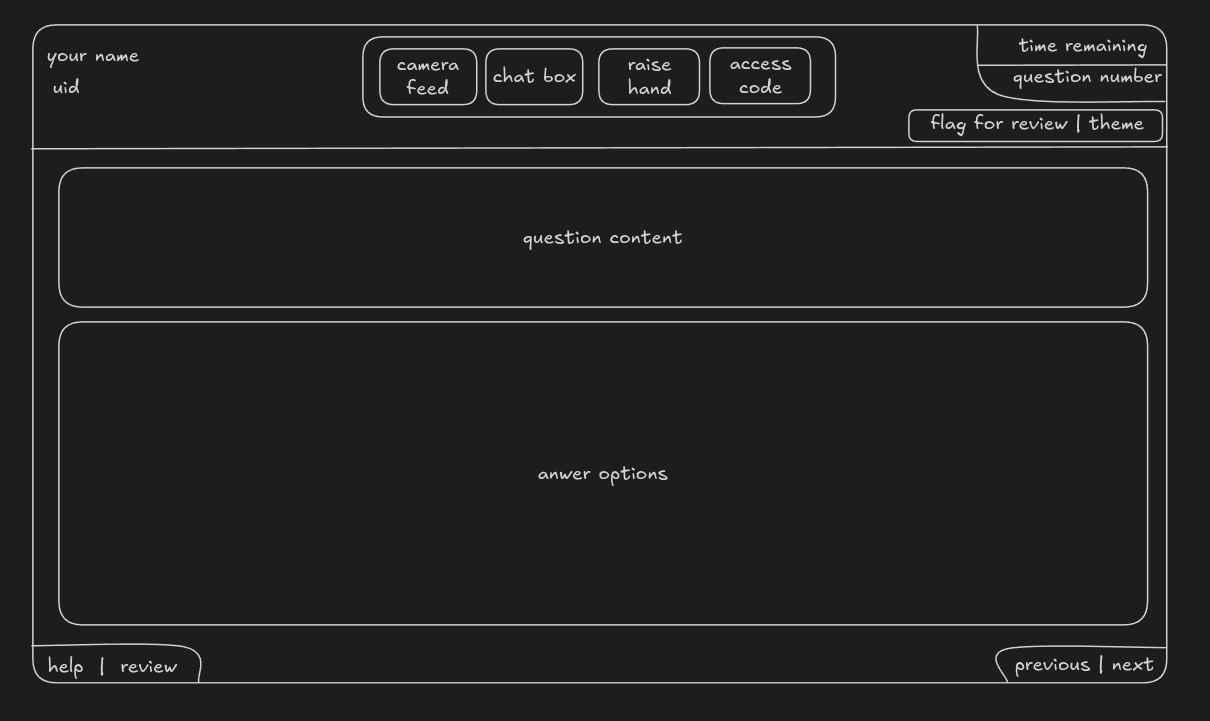
The question occupied most of the screen. The four answer options were on the left-hand side. The timer was displayed in the top-right corner, and just below it was the question number.
There was also a Review button in the bottom-left corner. I don't remember whether it was visible from the beginning or whether I noticed it only after completing all questions, but I definitely used it after finishing the exam once.
Here is a rough version of the interface the exam gave me:
You could also:
- flag questions for review
- highlight parts of the question
- strike through answer options
- use an on-screen whiteboard
During the exam, you can communicate with the proctor if you face any issue. I contacted the proctor once by clicking the chat button beside the camera feed.
Time management
It took me around 53 minutes to answer all the questions once.
After that, I used the remaining time to review everything properly. Even after reviewing all my answers, I still submitted the exam around three minutes before the allotted time ended.
After ending the review and submitting the exam, I was asked 12 questions about my exam experience. I filled out all 12 of them.
Once that was done, I received my provisional result.
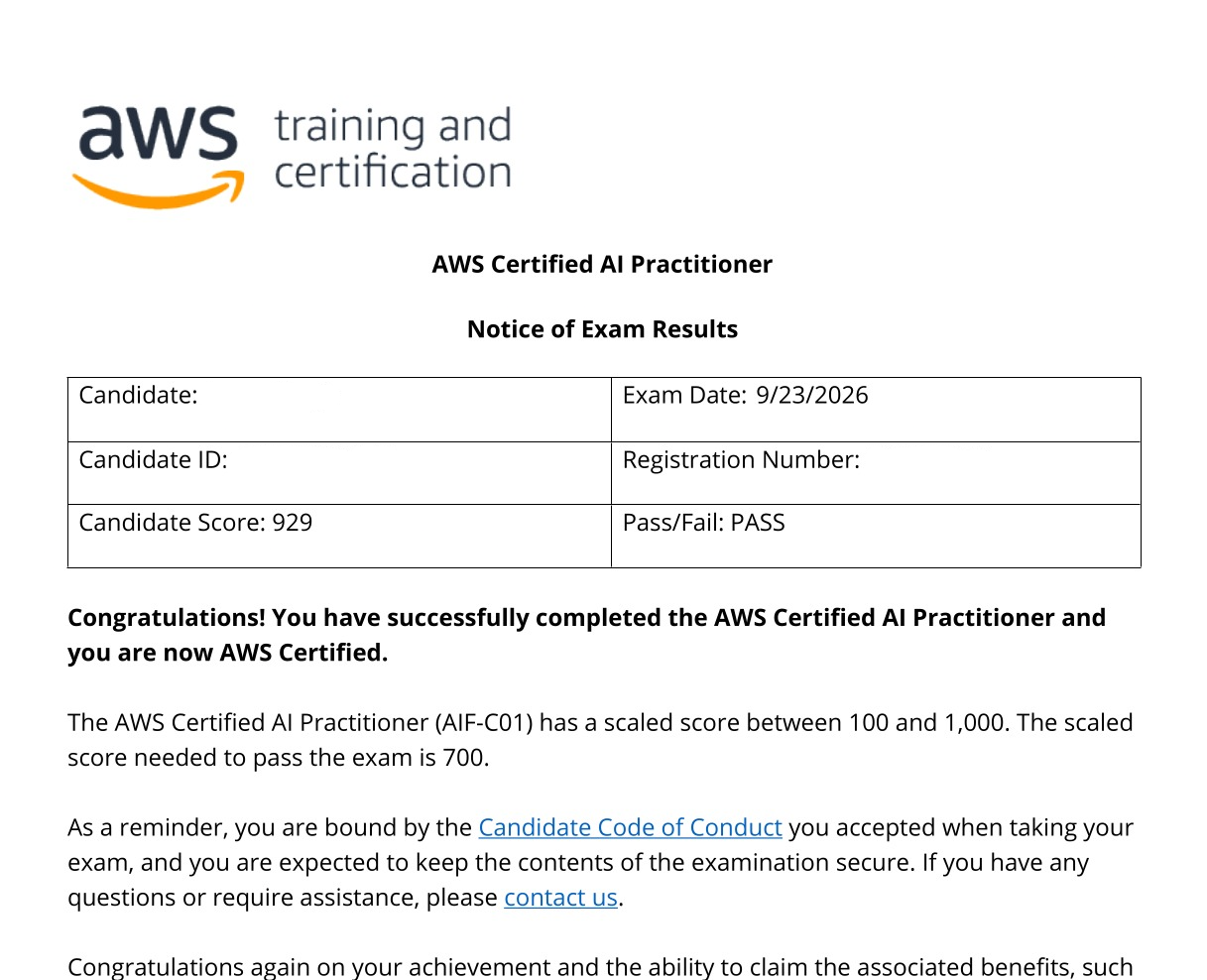
It was a PASS.
After the exam
I submitted the exam around 4:00 PM IST.
The official confirmation email came at 2:03 AM IST, so it took around 10 hours to receive the final confirmation email and badges.
After receiving the provisional result, I was able to exit the application and finish the exam process.
Here is my scorecard:
Final thoughts
If you are preparing for this exam, AWS Skill Builder is very useful. The pre-tests and practice exams gave me a good sense of the actual question pattern.
Using LLMs also helped, but mostly as a support tool. The important part was not just asking for answers, but asking them to explain concepts, generate similar questions, and help me practice repeatedly.
The exam was not scary, but the check-in process can feel stressful if something does not update immediately. Stay calm, read everything carefully, and follow the proctor's instructions.
That was my full exam experience.